Page 1 of 2
Can't get PC DVI to work with my display?
Posted: Tue Jan 22, 2008 7:51 am
by DavidJones4
I now have a 26inch ACER, it has both DVI and VGA, can I connect both cables and switch between each during active desktop?
Posted: Tue Jan 22, 2008 1:53 pm
by Richard
lost... you are connecting DVI and VGA from your PC to the display? If so for what purpose?
Posted: Tue Jan 22, 2008 3:12 pm
by DavidJones4
Well I couldn't get a signal via DVI for set up, so I used VGA and it was plug and play, and now that I'm in the menu I can see a toggle between analogue and digital.....so I selected digital and it no-signaled me again.
I should add that the monitor has a DVI-D port, and supplied a DVI cable, but I'm not a 100% sure my DVI output from my 2005 x800gt is DVI-D, it might be one of the other DVI-I/DVI-A....would that be the problems?
Posted: Tue Jan 22, 2008 5:09 pm
by Richard
Your video card has both VGA and DVI connectors? That seems odd to me... usually it is DVI only and you use a DVI/VGA adapter to make it VGA...
Posted: Tue Jan 22, 2008 5:19 pm
by DavidJones4
Yep, I bought it in 05...it has both ports, I've been using a CRT on it for the past 3 yrs.
I must admit that VGA is excellent quality anyway, but I'm just curious if DVI would do anything more with HDTV.
DVD and native HDTV looks fine, but anything SDTV upscaled or otherwise is ordinary, but still very watchable.
Posted: Tue Jan 22, 2008 5:35 pm
by Richard
Digital versus analog comes up all the time around here... it is very difficult to see when all things are correct. If this were a different time, different products, different application we might have a different discussion on this but with a PC...? Difficult to argue for DVI and it would all be technicalities...
Anyway, it could be the output resolution setting but I would think that remains the same regardless of which type you select. Usually the EDID is pulled, info on your display for automated settings, and the card selects an appropriate scan rate - appropriate to making things work and not always the best choice.
Are you using an old DVI cable that was meant for analog applications? DVI was designed to support both. It should be DVI-D...
DVI
viewtopic.php?t=4149
Posted: Tue Jan 22, 2008 6:01 pm
by DavidJones4
The cable is the one supplied with monitor I bought yesterday.
When I hooked up the VGA cable, my desktop was launched at 1024x786{my old CRT res}, so maybe that's the problem, maybe If I try with my new default 1920x1200 setting it will work.
Posted: Tue Jan 22, 2008 6:07 pm
by DavidJones4
I appear to have a DVI-I port on my GPU, but i think the DVI cable I have is DVI-D......will that cause incompatibilities....?..........I suspect the Acer also has a DVI-D port.
Video Board Connectors
Posted: Wed Jan 23, 2008 8:24 am
by jjkilleen
Richard-it's not that unusual to have one DVI and one VGA connector on a video board-I have a 7600GS I bought a few months ago with one of each.
Posted: Thu Jan 24, 2008 8:19 pm
by dabhome
DavidJones4 wrote:I appear to have a DVI-I port on my GPU, but i think the DVI cable I have is DVI-D......will that cause incompatibilities....?..........I suspect the Acer also has a DVI-D port.
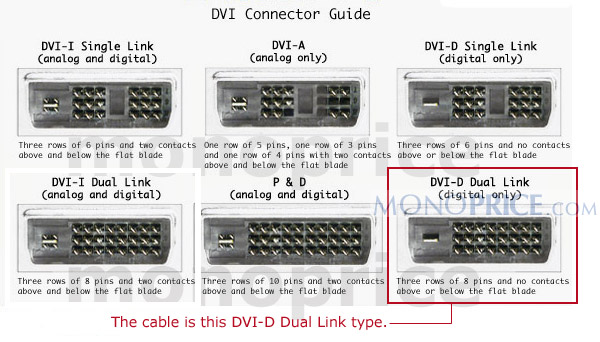
There are numerous types of DVI cables. The three most common are DVI-A (analog), DVI-D (digital) and DVI-I (both). In addition, it may be a single link vs. dual link cable. The following image will tell you what type of cable you have
http://www.ss427.com/dvi-d-dual-link-di ... -cable.jpg
If you have a DVI-I or DVI-D cable then you can output the signal digitally which will produce the best picture. You should look in your TV manual to determine what is the maximum resolution it will take on the DVI port. You also may have to tell the PC to output it digitally instead of analog.
Finally, some TVs display DVI signals with a lot of overscan. Therefore, you may need to adjust the output. Nvidia card drivers have options for doing this. I don't know about other drivers.
Good Luck,
David