
articles
CinemaScope™ HDHT - Part 3 - Screens and Aspect Ratios
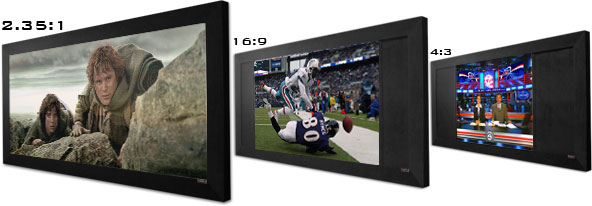
The following article is the latest in the CinemaScope™ series by Rodolfo La Maestra. Other articles in this series are as follows:
I use the word CinemaScope™ to convey the idea of any content with an aspect ratio that is wider than 1.78:1 (16:9 HDTV), which would be displayed with black top/bottom bars on any HDTV. If your HDTV has a fixed frame, such as an LCD/plasma panel or a rear-projection TV, and you want to see the CinemaScope™ image at its intended aspect ratio, there is not much that can be done about the bars at the top and bottom of the screen. As a result, the bars use part of the valuable vertical resolution of the 16:9 TV or the projector's chip. To make things worse some technologies, such as LCD projection, show the black bars as dark gray, distracting the viewing of the actual image. The HD chip of a front projector is fixed to the resolution of its design (720px1280 or 1080px1920 pixels). Many projectors today are chip-based DLP, LCD, and LCoS technologies at 720p resolution. More recently, several affordable 1080p projectors were introduced to the market. Regardless of the projector's resolution, there will be a loss of about 30% of the vertical resolution (measured top to bottom) when displaying the blacks bars of a wider CinemaScope™ letterboxed movie without using a CinemaScope™ system. However, something can be done with front projectors to use the full resolution of the chip when displaying CinemaScope™ images in wider screens; A CinemaScope™ system with anamorphic lens, capable scaler, and a 2.35:1 screen can be implemented. For some Home Theater enthusiasts, retaining that resolution and viewing 2.35:1 movies in 2.35:1 screens is sufficient to pursue a full CinemaScope™ system.
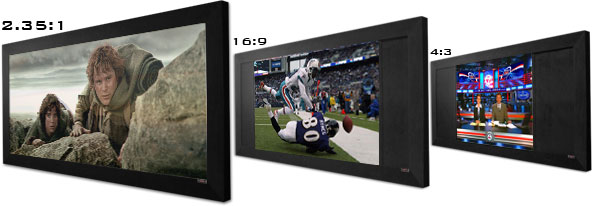 CinemaScope™ Using a 16:9 Screen
As mentioned before, a 2.35:1 screen would be ideal for showing a 2.35:1 CinemaScope™ movie, and, when displaying 16:9 images, the CinemaScope™ system would maintain the same "Constant Height" using the same 2.35:1 screen.
However, what happens if one has an existing 16:9 screen and wants to use it also to display wider content of 2.35:1 aspect ratio? Although these articles are not intended to cover this particular scenario in depth, allow me to offer some brief comments about this subject.
While it is possible to view wider CinemaScope™ content on a 16:9 projection screen (using or not a CinemaScope™ scaler and anamorphic lens) we know that the image width will be limited by the width of the 16:9 projection screen, which would make the 2.35:1 CinemaScope™ image shorter with top/bottom black bars, and the objects on it appear relatively smaller than 16:9 material displayed on the same 16:9 screen.
A CinemaScope™ system, regardless of the aspect ratio of the screen, requires a scaler adding approximately 30% interpolated horizontal lines stretching the image vertically to use the full 720 or 1080 vertical resolution of the projector's chip (making objects look thinner and taller), then the anamorphic lens would stretch the image horizontally to restore its original geometry.
Some home theater enthusiasts migrating to a 2.35:1 screen installation (and those not migrating as well) might find it tempting to start using a CinemaScope™ system with an existing 16:9 screen under the theory that maximizing the projector's vertical resolution with the scaler would provide a better image than the original at the same size.
The assumption of "more lines/pixels should render a better image" might sound tempting on the surface, but those are not pixels of original resolution, those are "scaler magic". What happens when your magician is not perfect?
Depending on the CinemaScope™ system's electronic and optical quality, the manipulation on the four axes of the image could negatively affect the quality of the original image that had fewer pixels but were pixel-perfect-fit from source to display.
In other words, it might be better to display the image as it is, and accept that a 16:9 screen will not accommodate for a wider image, which is actually the main objective of a CinemaScope™ system; displaying a wide-image wider without making it shorter.
Additionally, the approach of using a 16:9 screen for CinemaScope™ images is not considered "Constant Height" until a 2.35:1 screen is used to complete the CinemaScope™ system, and that is where the net gain in benefits is to be found.
Although it is a matter of personal choice to start with these components of the CinemaScope™ system using an existing 16:9 screen and get the 2.35:1 screen later, one should be concerned with ruining a pixel perfect image just by assuming that 30% more interpolated lines to use the projector chip's full resolution would be an improvement on the same size of image.
If a CinemaScope™ system would not be used for a 16:9 screen, why would Home Theater people use a 16:9 screen for images of wider aspect ratios? Many Home Theater rooms have limited left/right space and have installed 16:9 screens to maximize the overall image size of more frequent viewing of 16:9 and 4:3 content. Those people do not mind occasionally viewing a 2.35:1 image relatively smaller than 16:9 content, more on this later.
The Wider Formats
Many modern movies are filmed/transferred as 2.35, 1.85, 1.78, 2.40, 2.39, etc. According to some publications that show aspect ratio information, such as Widescreen Review Magazine, in a recent 5 month period 50-60% of the reviewed movies were at or wider than 2.35:1, but mostly 2.35:1.
Most of the newer Hi-Def DVDs are being released at 2.35:1 and wider. Blu-ray in December 2006 introduced five 2.35:1 movies vs. three of smaller aspect ratios, in January introduced six vs. three, and in February introduced six vs. two. The HD DVD format on the same period was about half and half.
It would be interesting to also analyze the timing and implementation tendency of wider formats for filmmaking, to determine if there is a gradual shift toward the use of wider formats in a 16:9 HDTV era.
Regarding regular DVD releases, during 2 weeks in December 2006, 15 titles were 2.35:1 and wider, three were listed as TBD, and nine titles were not wider than 2.35:1.
Historically, movie theater film shifted to wider aspect ratios when NTSC TV was introduced over 50 years ago with a similar 4:3 aspect ratio, to offer a theatrical format that could not be viewed on a TV at home, and keep the public interested in attending the local movie theater.
Now that TV is 16:9, Hollywood might be inclined to use wider than HD formats more frequently to attract the public to the local movie theater with widescreen movies viewed without black bars. The movie-making industry must be maintained alive and the art supported, regardless of what TV system is in place. Everyone needs this art in one way or another.
Some directors select the 16:9 aspect ratio so their movies can be viewed on an HDTV at home exactly the same way as they are viewed in the theater, with no black-bars.
This series of articles is not intended to cover the aspect ratio differences and their implementation in filmmaking. For that subject, I recommend reading some articles published over the years by the Widescreen Review Magazine.
If CinemaScope™ movies are increasingly released, it will be beneficial to have a home theater system capable of maximizing the resolution of 16:9 projectors for CinemaScope™ viewing by using anamorphic lens and enabled scalers.
The Viewing Position Using a CinemaScope™ System with 2.35:1 Screens
When using a 2.35:1 screen with a CinemaScope™ system implementing "Constant Height", one should determine sound and viewing positions based on 16:9 viewing. The scaler would make 2.35:1 viewing maintain the same image/screen height of a 16:9 image. The anamorphic lens expands the image laterally to cover the entire width of the 2.35:1 screen, increasing the angle of view and the cinematic impact.
There is no need to change viewing positions or audio sweet spots when changing aspect ratios, and no need to adjust the zoom, focus, etc. The system should be seamless. Some systems even operate by having the scaler auto-detect the aspect ratio of the content, switch the aspect ratio automatically, and issue control commands to automatically move the anamorphic lens/sled in/out of the path of the projector, move screen masks to adapt to the image, roll curtains, etc.
As a viewer, you just select the content and let the system work for you.
The Viewing Position Using a 16:9 Screen Also for CinemaScope™ Viewing
On the other hand, when using a 16:9 screen and no system, there is always the alternative of doing nothing, waste some of the projector's resolution and light output to display 30% of black bars, and learn to live with a shorter 2.35:1 image on a 16:9 screen. Such approach might prompt you to move the viewing position closer to the screen to adjust to the smaller 2.35:1 image to receive a cinematic impact.
While the lateral angle of vision did not increase, having a shorter image makes objects within it proportionally smaller than the same objects within a taller 16:9 image that uses the full area of the screen, both having the same width. For that reason, when switching back to view larger 16:9 images you might want to move the seating position further from the screen.
Switching viewing positions to adjust to the aspect ratio of the image could not only be inconvenient, but could also potentially affect the sweet spot of multi-channel audio when it was calibrated for one viewing position, while is unacceptable for the other.
It is impractical to change the speaker's location to adjust the multi-channel audio sweet spot as you switch viewing-positions, and it is certainly an impossible option if the speakers are mounted in the walls/ceilings.
Stay tuned for the next article in this CinemaScope™ HDHT series.
CinemaScope™ Using a 16:9 Screen
As mentioned before, a 2.35:1 screen would be ideal for showing a 2.35:1 CinemaScope™ movie, and, when displaying 16:9 images, the CinemaScope™ system would maintain the same "Constant Height" using the same 2.35:1 screen.
However, what happens if one has an existing 16:9 screen and wants to use it also to display wider content of 2.35:1 aspect ratio? Although these articles are not intended to cover this particular scenario in depth, allow me to offer some brief comments about this subject.
While it is possible to view wider CinemaScope™ content on a 16:9 projection screen (using or not a CinemaScope™ scaler and anamorphic lens) we know that the image width will be limited by the width of the 16:9 projection screen, which would make the 2.35:1 CinemaScope™ image shorter with top/bottom black bars, and the objects on it appear relatively smaller than 16:9 material displayed on the same 16:9 screen.
A CinemaScope™ system, regardless of the aspect ratio of the screen, requires a scaler adding approximately 30% interpolated horizontal lines stretching the image vertically to use the full 720 or 1080 vertical resolution of the projector's chip (making objects look thinner and taller), then the anamorphic lens would stretch the image horizontally to restore its original geometry.
Some home theater enthusiasts migrating to a 2.35:1 screen installation (and those not migrating as well) might find it tempting to start using a CinemaScope™ system with an existing 16:9 screen under the theory that maximizing the projector's vertical resolution with the scaler would provide a better image than the original at the same size.
The assumption of "more lines/pixels should render a better image" might sound tempting on the surface, but those are not pixels of original resolution, those are "scaler magic". What happens when your magician is not perfect?
Depending on the CinemaScope™ system's electronic and optical quality, the manipulation on the four axes of the image could negatively affect the quality of the original image that had fewer pixels but were pixel-perfect-fit from source to display.
In other words, it might be better to display the image as it is, and accept that a 16:9 screen will not accommodate for a wider image, which is actually the main objective of a CinemaScope™ system; displaying a wide-image wider without making it shorter.
Additionally, the approach of using a 16:9 screen for CinemaScope™ images is not considered "Constant Height" until a 2.35:1 screen is used to complete the CinemaScope™ system, and that is where the net gain in benefits is to be found.
Although it is a matter of personal choice to start with these components of the CinemaScope™ system using an existing 16:9 screen and get the 2.35:1 screen later, one should be concerned with ruining a pixel perfect image just by assuming that 30% more interpolated lines to use the projector chip's full resolution would be an improvement on the same size of image.
If a CinemaScope™ system would not be used for a 16:9 screen, why would Home Theater people use a 16:9 screen for images of wider aspect ratios? Many Home Theater rooms have limited left/right space and have installed 16:9 screens to maximize the overall image size of more frequent viewing of 16:9 and 4:3 content. Those people do not mind occasionally viewing a 2.35:1 image relatively smaller than 16:9 content, more on this later.
The Wider Formats
Many modern movies are filmed/transferred as 2.35, 1.85, 1.78, 2.40, 2.39, etc. According to some publications that show aspect ratio information, such as Widescreen Review Magazine, in a recent 5 month period 50-60% of the reviewed movies were at or wider than 2.35:1, but mostly 2.35:1.
Most of the newer Hi-Def DVDs are being released at 2.35:1 and wider. Blu-ray in December 2006 introduced five 2.35:1 movies vs. three of smaller aspect ratios, in January introduced six vs. three, and in February introduced six vs. two. The HD DVD format on the same period was about half and half.
It would be interesting to also analyze the timing and implementation tendency of wider formats for filmmaking, to determine if there is a gradual shift toward the use of wider formats in a 16:9 HDTV era.
Regarding regular DVD releases, during 2 weeks in December 2006, 15 titles were 2.35:1 and wider, three were listed as TBD, and nine titles were not wider than 2.35:1.
Historically, movie theater film shifted to wider aspect ratios when NTSC TV was introduced over 50 years ago with a similar 4:3 aspect ratio, to offer a theatrical format that could not be viewed on a TV at home, and keep the public interested in attending the local movie theater.
Now that TV is 16:9, Hollywood might be inclined to use wider than HD formats more frequently to attract the public to the local movie theater with widescreen movies viewed without black bars. The movie-making industry must be maintained alive and the art supported, regardless of what TV system is in place. Everyone needs this art in one way or another.
Some directors select the 16:9 aspect ratio so their movies can be viewed on an HDTV at home exactly the same way as they are viewed in the theater, with no black-bars.
This series of articles is not intended to cover the aspect ratio differences and their implementation in filmmaking. For that subject, I recommend reading some articles published over the years by the Widescreen Review Magazine.
If CinemaScope™ movies are increasingly released, it will be beneficial to have a home theater system capable of maximizing the resolution of 16:9 projectors for CinemaScope™ viewing by using anamorphic lens and enabled scalers.
The Viewing Position Using a CinemaScope™ System with 2.35:1 Screens
When using a 2.35:1 screen with a CinemaScope™ system implementing "Constant Height", one should determine sound and viewing positions based on 16:9 viewing. The scaler would make 2.35:1 viewing maintain the same image/screen height of a 16:9 image. The anamorphic lens expands the image laterally to cover the entire width of the 2.35:1 screen, increasing the angle of view and the cinematic impact.
There is no need to change viewing positions or audio sweet spots when changing aspect ratios, and no need to adjust the zoom, focus, etc. The system should be seamless. Some systems even operate by having the scaler auto-detect the aspect ratio of the content, switch the aspect ratio automatically, and issue control commands to automatically move the anamorphic lens/sled in/out of the path of the projector, move screen masks to adapt to the image, roll curtains, etc.
As a viewer, you just select the content and let the system work for you.
The Viewing Position Using a 16:9 Screen Also for CinemaScope™ Viewing
On the other hand, when using a 16:9 screen and no system, there is always the alternative of doing nothing, waste some of the projector's resolution and light output to display 30% of black bars, and learn to live with a shorter 2.35:1 image on a 16:9 screen. Such approach might prompt you to move the viewing position closer to the screen to adjust to the smaller 2.35:1 image to receive a cinematic impact.
While the lateral angle of vision did not increase, having a shorter image makes objects within it proportionally smaller than the same objects within a taller 16:9 image that uses the full area of the screen, both having the same width. For that reason, when switching back to view larger 16:9 images you might want to move the seating position further from the screen.
Switching viewing positions to adjust to the aspect ratio of the image could not only be inconvenient, but could also potentially affect the sweet spot of multi-channel audio when it was calibrated for one viewing position, while is unacceptable for the other.
It is impractical to change the speaker's location to adjust the multi-channel audio sweet spot as you switch viewing-positions, and it is certainly an impossible option if the speakers are mounted in the walls/ceilings.
Stay tuned for the next article in this CinemaScope™ HDHT series.