
I got HP 42" plasma widescreen TV with all kind of connection except DVI. I tried to connect my Dell Inspiron E1505 Laptop with VGA output to my HP but what happened was that my desktop were all messed up and everything on my HP TV were wide and distorted. Then I biult PC with ATI 256 MB video card with DVI and VGA output. When I connected DVI to HDCI on HP TV I tried to run internet but distortion (wide) was unpleasent to see and browse. I came back to VGA to VGA and that worked fine but I have to resized from 42" to 36" my screen and picture was kind of dimmed. So I took apart PC that I built and sold it as a parts. My question is: is there any adapter or software I can download or buy in market that will delivere picture or movie or give me same quality of screen for browsing on Internet like I have on my Laptop?
Dell laptop with VGA to HP Plasma 42" transfer movies?
Read-only archive
the model of that HP plasma is....?
Too bad you got rid of the computer. I have an ATI ALL IN WONDER 9600 display card It has a tv tuner and the display menu offers several different shapes for hooking to a TV. It would be worth a try for you. Just thought I would mention about the ATI card. They aren't cheap though, but cost is relative.
HP PL4260N is the model.
That one is 1024X768 and that is a 4:3 ratio for square pixels which means your pixels have to be rectangular to make it 16:9 and it is 16:9...
You are pretty much stuck. If you tell your video card to output 1024X768 it will be stretched as you have noted but that is the only way you will get the crystal clarity of 1:1 pixel mapping. The only way to correct the geometry is to output 1280X720 but then you lose clarity.
Choose your poison or replace the display...
You are pretty much stuck. If you tell your video card to output 1024X768 it will be stretched as you have noted but that is the only way you will get the crystal clarity of 1:1 pixel mapping. The only way to correct the geometry is to output 1280X720 but then you lose clarity.
Choose your poison or replace the display...
My bad luck. Thanks.
By the way can you advice me: What is the best combination? Laptop : 42" plasma
Desktop (quite) : 42 " plasma or LCD or what will be best to have to got true color or how ever they call picture on display 42" size or larger.
Thanks
Desktop (quite) : 42 " plasma or LCD or what will be best to have to got true color or how ever they call picture on display 42" size or larger.
Thanks
I'll get l1ake to answer the laptop versus desktop since he just did a bunch of research on this for gaming applications...
As for the display it has have a pixel depth native to video standards or PC standards. If you want it to also do great at HDTV then there are only two choices... 1280X720 or 1920X1080, those are the TWO numbers you are looking for; a statement of 720p or 1080p is inconclusive.
You can always get a PC to conform to an HDTV pixel depth display but you can't get HD to conform to a PC pixel depth display. As an example, a 1080p PC display is actually 1920X1200 and those extra 120 pixels typically spell disaster for HDTV sources.
As for the display it has have a pixel depth native to video standards or PC standards. If you want it to also do great at HDTV then there are only two choices... 1280X720 or 1920X1080, those are the TWO numbers you are looking for; a statement of 720p or 1080p is inconclusive.
You can always get a PC to conform to an HDTV pixel depth display but you can't get HD to conform to a PC pixel depth display. As an example, a 1080p PC display is actually 1920X1200 and those extra 120 pixels typically spell disaster for HDTV sources.
You have to be careful how you set your output. If you clone the output (have it display on both your laptop and pc), you'll probably run into trouble. If I was going to hook my laptop to a tv, I would make sure that the TV is the primary source and that the laptop display is the secondary. This makes it so you have complete control of the TV display (since that is what you are using it for anyway). Cloning, in general, isnt that great. You always lose control of the secondary output, so if that is your TV, it'll do the things you described (distort, stretch, etc). Unfortunately, it does seem that if you clone, the primary output has to be the display on the laptop. There are no other options. So if you are serious about watching it on your tv, you really should set your display mode to single display rather than clone. This does mean you will lose the display on the laptop. The only HD movies Ive ever watched on the PC were 720. I would assume that with a 1080 movie, you need to be careful about using full screen viewing. It will probably stretch the movie by 120 pixels rather than keeping it centered and pixel mapped. Windows Media Player will stretch a 720 video to 1440 (i run 1440x900 on my laptop) if I select full screen. I bet though that there is an option to prevent that while removing the nav/option bars (which is the point of full screen). In terms of what is better for viewing: the main thing you have to be careful with in a laptop is the hardware. A good example is that I have a slate tablet pc with some relatively poor hardware: 1.2ghz processor, integrated intel gpu. That thing will choke up on movies that are 1024x768, so I can only assume it would choke/slow down even more with HD movies. Desktops are generally better than laptops in terms of speed. You could probably go to walmart and get a video card capable of running HD movies. Im not sure if you want to play video games or not, but if you want it just for movies, here are some things to keep in mind: mobility. A laptop is extremely mobile compared to a desktop (depending on how you build the desktop of course - there are some micro atx cases that are designed for mobility - essentially a box with a handle). If you plan on having a mobile home theater pc, a laptop would seem ideal. However, for what you get, laptops are expensive compared to desktops. If you are going for HD movies only, a desktop would be cheap compared to a laptop. So if you aren't going to be wanting a mobile system, a desktop would probably be your best bet. There are cases out there that are designed for the home theater look. Essentially, the cases look like a DVD player. There is a ton of info here of course, so if you have any questions, feel free to ask. In terms of picture quality: plasma vs. lcd, I really cant help you there. Im sure Richard can.
to follow up: the desktop cases with that home theater look are called Media Center cases. Here are some examples:
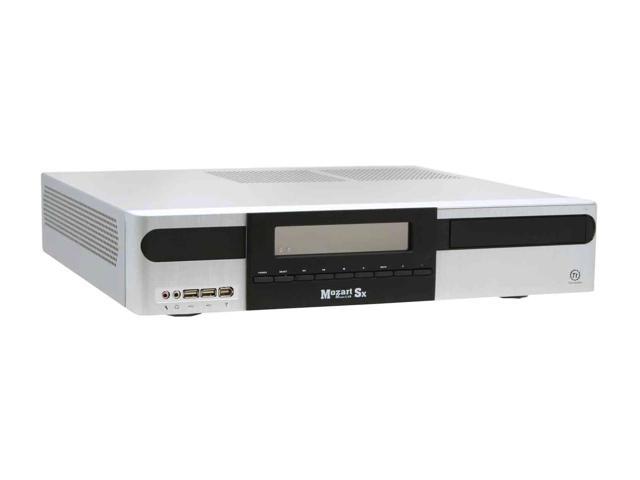

Well, I built desktop using 256 MB ATI Saphire video card and used HP PL4260N as display and still couldn't have great picture on TV. ATI card has 3 outputs: S-video, VGA and DVI. While using DVI to HDMI input couldn't use commands on TV to adjust picture and other features, using VGA to VGA allowed me to do some adjustment but still couldn't make picture look close to the one I could see on my laptop or watching HD TV channels.
From the answers you gave me I realized that HP PL4260N TV was not good option for browsing internet or watching movies from hard drive. Right now I am stuck with not too expensive but neither cheap TV.
My next question will be: In future, I'll build another desktop and I'll probably buy another HDTV but this time I don't want to make same mistake and, please advice me what will be best combination (video card : TV) for the picture without distortion and with full screen and great color?
All I want is to browse internet, watch movie from my hard drive, chat and watch my family and friends in full size trough Skype or Yahoo messenger from my comfortable recliner on big, big screen TV set.
Once again, thank you guys for helpful and quick answers.
From the answers you gave me I realized that HP PL4260N TV was not good option for browsing internet or watching movies from hard drive. Right now I am stuck with not too expensive but neither cheap TV.
My next question will be: In future, I'll build another desktop and I'll probably buy another HDTV but this time I don't want to make same mistake and, please advice me what will be best combination (video card : TV) for the picture without distortion and with full screen and great color?
All I want is to browse internet, watch movie from my hard drive, chat and watch my family and friends in full size trough Skype or Yahoo messenger from my comfortable recliner on big, big screen TV set.
Once again, thank you guys for helpful and quick answers.
just a quick reply: in terms of graphics, I would recommend an ATI card. They are know for image quality (where as nvidia is known for performance - possibly has better performance because of the lack/less video quality).
Here is some advertising:
The x1650 is a top runner so Im not really suggesting that you buy the biggest baddest most expensive card, but this was just an example in terms of their focus on image quality. Another note:
ISF Certification is awarded to industry leading products that have undergone strict testing to meet Image Science Research Labs high standard of graphic and multimedia quality.
ATI
Here is some advertising:
The Radeon X1650 scores 123 out of a possible 130 points in HQV tests, the highest score of any graphics card4
The X1650 is the industry leader in its class in video performance according to HQV testing, the standard method of measuring the picture quality of DVD playback.
Avivo display technology guarantees sharpness, clarity, and realistic colour reproduction
Avivo uses proprietary video scaling technology to display crystal clear images on high resolution displays. Video images sent to your display will be hardware accelerated for superb viewing.
High-definition video never looked so good
The Radeon X1650 will prepare you for the burgeoning HD video revolution by turning your PC into a machine equipped to handle HD content from a variety of digital sources
The x1650 is a top runner so Im not really suggesting that you buy the biggest baddest most expensive card, but this was just an example in terms of their focus on image quality. Another note:
ISF Certification is awarded to industry leading products that have undergone strict testing to meet Image Science Research Labs high standard of graphic and multimedia quality.
ATI
in terms of creating a silent pc (you dont want a humming generator as your HTPC), you may want to look around at this site:
http://www.silentpcreview.com/
They have a ton of information in terms of creating silent pcs.
http://www.silentpcreview.com/
They have a ton of information in terms of creating silent pcs.