
Quick Pick Review: DVDO Edge HD Video Processor (March 2009)
DVDO is a brand well known to home theater enthusiasts. In 1999, they shocked the home theater world (not to mention Faroudja) with the iScan, a $899 interlaced-to-progressive video processor that worked as well as any line doubler then on the market – most of which sold for as much as ten times the price of the iScan.
Over the years, DVDO (since acquired by Anchor Bay Technologies) has come out with a variety of video scalers and deinterlacers, first based on the iScan line and then moving to the VP-series processors. Along the way, ABT also rolled out its own custom ASICs that wound up in more than a few projectors and even one of Toshiba’s last HD DVD players.
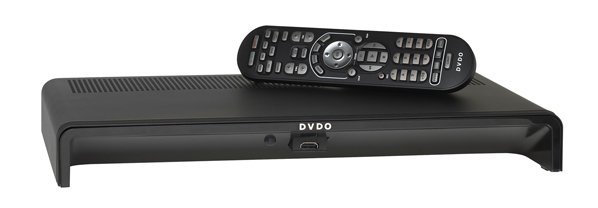
Figure 1. Not much going on with the front of the Edge, is there? (Can you see the hidden HDMI input?)
Times have changed, and video processing ASICs have gotten a lot more powerful while their per-unit process have dropped. It’s not unusual to get a high level of image processing even in a $3,000 1080p home theater projector these days, and CRT displays are pretty much gone from the market. Is there still a need (and a market) for stand-alone video processors?
The answer is – yes, if you have an older projector or have multiple analog and digital video sources to switch in and out of your system. For $800, the Edge is reasonably priced to function as an AV “hub” and you get a lot of functionality for your money. It uses the VRS ABT2010 processor, earlier limited to top-line VP-series ABT scalers.
You’ll notice the unusual wedge-shaped design of the Edge right away. All of the connectors and the AC power jack are located on the rear panel, while the front panel (if you actually can call it a “front panel”) slopes downward and consists of an IR sensor, plus a pop-down HDMI input jack.
Believe it or not, that’s one of six HDMI 1.3 inputs (yep, you read that right) on the Edge. The other five are located on the rear panel. All six inputs pass video and bitstream digital audio, which is important for more than the obvious reasons of switching input sources.
Analog video hasn’t been neglected. DVDO gives you two racks of component YPbPr video input jacks. These double as RGBHV inputs for computer sources, with additional H and V/composite sync RCA jacks located nearby. The obligatory composite and S-video inputs are also present. (Hey, each of us is still born with an appendix, and we don’t use that, either!)
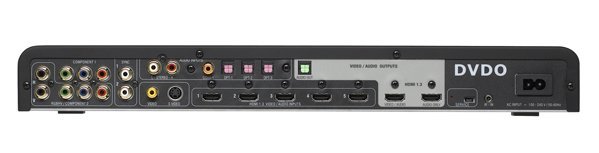
Figure 2. If the Edge doesn’t have your input connector, then you don’t need that connector!
For audio switching, you’ll find one stereo analog audio input, a single coaxial SPDIF digital audio jack, and three Toslink digital audio ports. That complement might be short one coaxial input in my thinking, but with six HDMI ports, you’re probably OK on digital hookups.
For outputs, you’ll have two HDMI 1.3 options. One passes both switched/processed video and audio, while the other passes audio only. That’s real handy for projector installations where video and audio part ways and travel in very different directions early on in the signal chain. DVDO has also provided a single Toslink digital audio output connector.
The balance of connectors includes a Mini USB service jack and a 1/8” mini jack for IR control. Oddly enough, there’s no RS232 control port. (For that matter, an Ethernet connection could have been included too, for remote control and Internet software updates.)
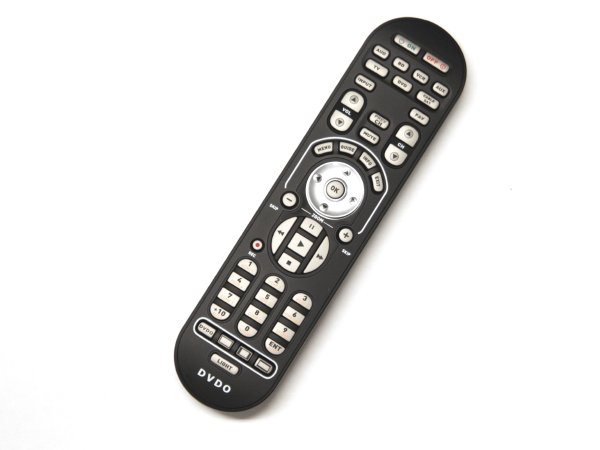
Figure 3. The supplied remote can control up to seven additional AV components – and it’s backlit, too.
The supplied remote is a “universal” design, and can handle up to seven other AV components. (It’s even labeled for a Blu-ray player!) The design is nice because (a) all of the buttons are clearly labeled, and (b) they’re large enough to operate even in a darkened room.
I won’t go into great detail about each of the menu tweaks found in the Edge – it would take a month to do so. Suffice it to say that you’ll be able to do the following.
(1) Assign priorities to any active inputs, analog or digital
(2) Switch audio normally associated with that input, or assign separate combinations of audio and video and then memorize them
(3) Choose between 14 different video output formats, based on both PC and video displays (these include 24Hz, 25Hz, 50Hz, and 60Hz refresh rates)
(4) Or, let Edge determine the optimum output display rate, based on the exchange of Electronic Display Identification Data (EDID) with your HDTV or projector through the processor’s HDMI output connector
(5) Select numerous aspect ratio options and memorize them for specific input signals
(6) Advance or delay digital audio to correct for latency errors (the range is from –56 to +200 milliseconds)
(7) Adjust and save picture settings like brightness, contrast, color saturation, hue, and sharpness for each input
(8) Apply analog and digital noise reduction as needed to different signals
(9) Zoom in or out of source signals, or shift them horizontally and vertically to get rid of sync or masking problems
It should be noted again that every setting and assignment you make will be saved in memory. So if you REALLY want to use stereo analog audio from your Blu-ray player, Edge will memorize that combination and use it when the player’s HDMI output is selected. (Don’t worry; Edge won’t tell you to have your head examined for doing this. However, I will…)
All of these adjustments appear as cleverly designed fade-in and fade-out overlay menus that are intuitive to navigate. Once you make your settings, they’re saved until you alter them again. So feel free to jump from one input to the next – Edge will remember your preferences and match everything up as best it can to your projector or TV (Within reason, of course –don’t expect VHS tapes to look all that good on a 50-inch 1080p plasma!)
My imaging tests were pretty simple. I connected the 480i component output from an OPPO DV-970H DVD player through the Edge and onto Pioneer’s Elite PRO-111FD 50-inch plasma monitor. Next, I loaded up the red laser Realta HQV DVD and stepped through each of the performance tests.
Needless to say, the Edge sailed through this part of the review. It gave me clean rotating bars in the jaggies tests, a smooth-as-silk waving flag, and locked up within milliseconds on the 3:2 Super Speedway clip. The analog noise reduction processing worked wonders in the nighttime desert clips, cleaning up lots of “sparkle” from the deep blue sky.
The multiple cadence tests didn’t fool Edge, either – it corrected every one of them, and pretty quickly, too. Even the Varispeed 3:2:3:2:2 sequence, which often trips up other video processors, came out cleanly. So did the mixed video titles over 3:2 filmed content – not a “jaggie” to be seen anyplace.
The next test was with the Realta HQV Blu-ray disc. For this sequence, I set the output of an LG BD300 Blu-ray player to 1080i, and stepped through the rotating bars, Video Resolution, and Film Resolution loss tests. Once again, the bars were super-clean (evidently the ABT2010 chip uses some pretty selective adaptive bandpass filtering to soften aliased edges), while the Video Resolution test was stable with no flicker.
The Film Resolution test was also smooth, but with a touch of judder. I didn’t see this when feeding a 1080i signal directly into the Pioneer, which also has a decent interlaced-to-progressive conversion process. Obviously the Edge does a full “weave” on both the odd and even fields in a 1080i frame, and interpolates motion while doing so. So, I’m at a loss to explain the slight juddering motion as the SMPTE test chart moved back and forth.
The digital noise reduction circuits work well, too. Tune in a standard-definition digital cable channel, and you’ll see plenty of macroblocks (MPEG over-compression artifacts) and mosquito noise, particularly around fast-moving objects. Edge will clean up a lot of that schmutz – not completely, but it won’t be quite as obvious. (Turning down edge enhancement also helps a ton when getting rid of MPEG garbage.)
In December of 2008, Anchor Bay released firmware version 1.1. It should be present on all new models, but if you find you’re running the older 1.0 version, it’s easy enough to upgrade, following the instructions at this location – http://www.anchorbaytech.com/dvdo_edge/EDGE_firmware_v1.1.php
Version 1.1 adds such goodies as 35 different test patterns, automatic chroma upsampling error correction, a 1:1 frame rate feature to support both 50Hz and 60Hz sources, and output color space and colorimetry selections. (That’s just scratching the surface.)
Every once in a while, an AV product comes along that resembles a Swiss Army knife in functionality. It’s been a few years, but DVDO’s Edge fits squarely into that category. (Actually, it’s more like one of those loaded knives that has everything from a magnifying glasses and saw to tweezers and a bottle opener.)
Upconversion, downconversion, image sizing, cropping, image correction, noise reduction, and latency adjustments – they’re all here for just $800, and they all work exceptionally well. That seems like a steal to me. It’s hard to see how the Edge would ever become obsolete – you’re likely to go through a few TVs or projectors before you hit the limits of what it can do. (And if Anchor Bay provides a way to get software updates directly from the Internet, you may never get close!)
Video Inputs: 1x composite, 1x S-video, 2x YPbPr component, 2x RGBHV PC, 6x HDMI 1.3
Video Outputs: 1x HDMI 1.3 video/audio, 1x HDMI audio only
Audio Inputs: 1x RCA stereo, 1x SPDIF coaxial, 3x Toslink, 6x HDMI
Output Formats: VGA-SXGA< 480p, 576p, 720p, 1080i/p 24/25/50/60
Anchor Bay Technologies, Inc.
300 Orchard City Drive
M/S 131
Campbell, CA 95008