
Typical Passive 3DTVs - Displaying and Perceiving 3D Images
The first article of this series covered the current battle of 3DTV technology concepts between active and passive 3DTV manufacturers. The second article provided a brief introduction of how passive and active 3DTV differ in displaying video pixels to make 3D images. This article further expands the illustration of the passive 3DTV method. The next article will illustrate LG's implementation of the passive 3DTV display method.
Small Pixels make big Images and are all Important for Image Quality
TV/camera pixels are very minuscule and typically contain information of small sections of larger objects appearing in an image. As introduced in the previous article, in order to convey the idea of how pixels ultimately show on a passive 3DTV the following pictures illustrate the pixels as capable of showing larger objects viewed from both angles.
A 3D camera-pair simultaneously captures the left angle of an object by the left camera, and the right angle by the right camera, typically separated by 65 mm from each other (the average adult eye separation). The camera records 1080 lines of 1920 pixels for the left image (2-million pixels) and another 1080 lines of 1920 pixels for the right image. 3D Blu-ray stores that level of quality.
An ideal 3DTV would show the two images of 2-million-pixel to both eyes to convey the 3D effect, but most 3DTVs in the market do not have 4 million pixels to show both images at once, and even if they do the left image would be shown relatively shifted from the right image (1 pixel/line) compared to real life viewing of depth. This article discusses how both technologies show a 3D picture considering their panel limitations.
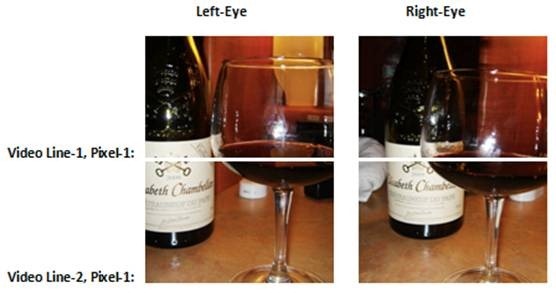
The left column of the following pictures represents the pixel 1 of the first two video lines of the left image as recorded by the left 3D camera. Only pixel 1 of lines 1 and 2 of the left image are shown for this illustration. The right column represents the pixel 1 of the first two video lines of the right image as recorded by the right 3D camera. Only pixel 1 of lines 1 and 2 of the right image are shown for this illustration.
3D images as recorded by 3D camera-pair
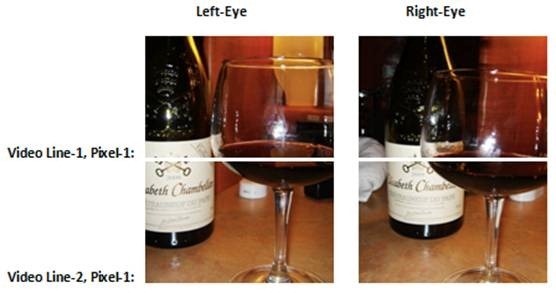
To convey the idea of pixel content the illustration was made so the wine bottle/glass objects are larger than one pixel (for either left or right angles) and require video line-1 of the left and right cameras to record the top part of the wine bottle/glass, and video line-2 of the left and right cameras to record the bottom part of the wine bottle/glass.
Notice the background objects relative to the close-up wine glass, such as the wine bottle, the white towel at left side of the bottle, and the white and black small plastic objects on the table behind the wine glass. Notice the lateral shift of the background objects relative to the close-up wine-glass when comparing the left camera angle with the right camera angle.
Notice also the effect of changing the angle of view on the small white plastic object, appearing at the left side of the glass on the left image (pictured in left-line-2 pixel-1) but appearing at the right side of the glass on the right image (pictured in the right-line-2 pixel-1).
Notice the right image showing a white towel at the left side of the wine bottle, while the towel does not even show on the left image. Notice the glass partially masking the label of the bottle on the right image, while the left image shows no masking, and rather shows the glass at the right side of the bottle.
Real Life 3D
You can do your own experiment viewing a real close-up object relative to background objects. Close each eye alternatively and notice how objects in the background shift laterally relative to the close-up object of your choice.
Open both eyes and see how the brain blends the shifted views together to interpret depth. A single eye can still see some depth though, using visual cues such as overlapping, shades, relative object sizes, etc. to help the brain determine the positions of the objects relative to others.
In real life both eyes see every picture element from both angles simultaneously coming from the exact same point in space emitting their full light/contrast/sharpness, the brain blends them together to perceive depth, and the two “images are always present in front of both eyes. Neither method of 3DTV, passive or active, is able to do that but they do a decent job considering their limitations.
The brain uses 25% of its power for visual perception. The second episode of the brain-series of Charlie Rose covers this subject. I expand further the subject (applicable to 3DTV) in the section “Is that What the Brain Thinks when Viewing 3D? of this article.
Active vs. Passive 3DTV
As mentioned in the previous articles, active-shutter 3DTVs show the whole image from each angle which is quickly displayed to the corresponding eye by alternating video frames. When the left eye sees the left image the right eye sees black, and vise verse; the 3D glasses are electronic LCD devices that work in sync with the TV.
Although the whole 1920x1080p pixel detail of each image is shown to each eye, it is shown alternatively not simultaneously. The method uses speed of presentation to show both angles, the brain is expected to blend the two images and interpret depth. No video line polarization is needed. Each pixel is shown in the correct x/y position within either image.
On the other hand, a typical passive 3DTV takes from the disc the first line of the left image and interleaves it with the second line from the right image. The TV does the same with the 3rd line of the left and the 4th of the right, and so on. In other words the TV merges lines from both images so the even lines of the left image and the odd lines of the right image are ignored by the 3DTV sampling, so the resolution of the panel is shared by the two half-resolution images.
The video lines are polarized by the screen so the left eye would not see the video lines seen by the right eye, and vise verse.
3D Images Shown by a Typical Passive 3DTV
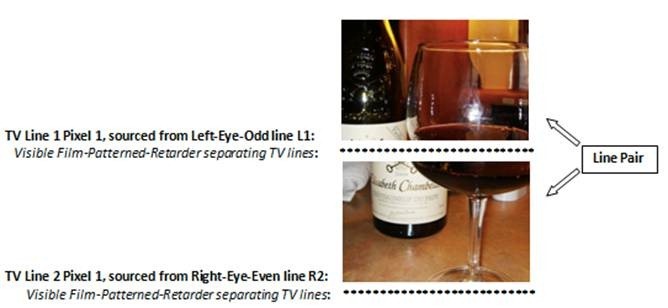
Notice the shifting of the background objects when combining pixels/lines from different angles. While the close-up of the wine-glass appears to fit correctly in the image pair, the bottom part of the bottle does not match with the top part, and the white towel of the bottom image appears truncated on the top image.
Regardless of the content of L1 and L2, all the remaining 539 pixel-pairs/lines of the image would show a similar shift, as implemented by the passive interleaving approach.
As mentioned before, due to a fixed polarization, the odd-lines are only viewed by the left eye and the even-lines are only viewed by the right eye, but by merging the lines of both angles (with shifted background objects) and by discarding half of the lines in between for each eye the vertical continuity of images is less smooth than if the two original images could be presented simultaneously to the eyes as a whole. The two angles of the same pixel location are never shown in passive 3DTV.
Although the active-shutter method does not show both angles/images simultaneously to both eyes as the passive method does, it shows the whole pixel resolution on each image and each pixel/angl is displayed at its corresponding location within both images.
The next article in the series will cover how LG Display passive 3DTVs show 3D images.