
Logitech Harmony One Universal Remote with Color Touchscreen
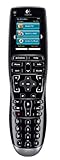
Manufacturer: Logitech, IncList Price: $249.99
Street Price: $169.99
Amazon.com: $161.87
|
|
Logitech Harmony One Universal Remote with Color TouchscreenManufacturer: Logitech, IncList Price: $249.99 Street Price: $169.99 Amazon.com: $161.87 This week we finally get to the review a lot of listeners have been asking for, the Harmony One Advanced Universal Remote by Logitech. We reviewed the Harmony 880 almost three years ago, and although Ara questioned the price premium, it eventually became our standard universal remote recommendation. Now with the release of the One, we were eager to see if it would replace the 880 in our hearts and minds. It won the 'Best of Innovations' award in the Home Theater Accessories category at CES 2008. You can find it in retail stores and online for an MSRP of $250 US. Setup
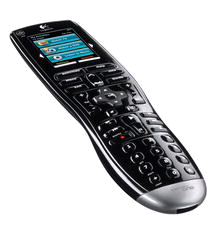
In addition to the remote, the box includes a charging base with power cord, a USB cable for programming, a rechargeable battery, and a CD with the programming software. Harmony programming used to be done completely online. They now have a cool desktop application that connects back to the Internet for you, making the user interface much more responsive. Of course a live Internet connection is still required, but that's not too difficult for our audience. After installing the software, you log into your account (or create a new on) and walk through the wizard to set it up. First you input all the devices in your home theater, which is as easy as entering a manufacturer and a model number. Harmony then walks you through setting up activities, like "Watch TV" or "Watch DVD" so that you can control everything seamlessly. You have the ability to fine tune the programming, but most users won't need to do too much. DesignThe layout of the remote is very familiar, an LCD screen at the top, navigation controls in the middle, and transport and keypad on the bottom. Traditionally the biggest challenge with Harmony remotes has been button size; they're simply way too small. The One, however, introduces larger buttons that are very easy to use. It fits in your hand very well and has a nice balance. The coolest new feature is the touch screen. While the 880 has a nice color screen on it, it requires that you press a tiny button on the side of the screen to activate an activity or use the custom buttons that can be there. With the One, you just touch the button or activity. Touchscreen remotes are very sexy, but they tend to be difficult to use because of the lack of hard buttons and the need to "page" through a bunch of screens to find the button you need. The Harmony One is a great blend between sexy touchscreen and functional hard buttons. UseLike the 880, the One is rechargeable, so there's never a need to replace batteries. This may sound like a small thing, but when your remote goes out and you can't scrounge up batteries for it in the house, you're in trouble. Functionally it is very similar to the 880; it lights up when you move it, has the same "help" feature to guide you when devices get out of sync, and does a great job controlling the home theater by activity rather than device. You can trick out the One by adding cool channel icons to the touch screen for your favorite channels. The software only seems to include icons for Fox channels, but you can download a zip package full of other icons from IconHarmony.com. ConclusionAs with any Harmony remote, the One is a great choice for your home theater. It's new, sexy and easy to use. The touchscreen is cool and the larger buttons make it a bit easier to use. But overall it doesn't represent a huge departure from the 880. Of course we're gadget freaks, so we'll both be using them, but if you want to save some money, the 880 remains a great option. Bang for the buck, the 880 is still probably the way to go. For the coolness factor, the One is where it's at. Posted by The HT Guys, March 17, 2008 9:44 AM Reader Commentarydturkheimer • Mar 17, 7:43pm The Harmony remote has an insurmountable problem with some TV's which prevents it from doing what many people -- myself included -- get if for: to enable one's spouse to watch TV! Here's the issue: In order to change input sources on my TV, you have to press the Channel Up button cycling through each input source until you get to the one you want. Then you press the Select button and you're good. In order to automate this, the Harmony remote will try to count the input key pushes needed to get where you need to go. But how does it know where to start? If startup always brought the cursor to the top of the screen -- to the first input -- then the Harmony remote could momentarily turn off the TV to force the cursor to the first choice. But my TV does not force the cursor to the first one. Wherever it is at the time of the TV's shutting off is where it is when you turn it on again. Since the position of the cursor is indeterminate, the Harmony cannot gracefully change t... regman • Mar 17, 9:54pm It's really a matter of how the video input is selected on the HDTV monitor. On my older CRT Panasonic you had to advance through the different inputs to select the right one. I bought a receiver that switches video and eliminated ever having to change the input on the monitor. It can be done though and the 880 has a "help" function to guide you to getting the setup you want. My wife can operate the older HDTV, but not with the old A/V receiver. I have a Harmony 1000 with my new home theater and it even dims and turns up the light at the appropriate times. One button operation. Logitech has really done their homework on these products. They're just a phone call away and will help you tweak it if need be. HDMI has made it even simpler.... spartanstew • Mar 18, 6:52am The Harmony remote has an insurmountable problem with some TV's which prevents it from doing what many people -- myself included -- get if for: to enable one's spouse to watch TV! Here's the issue: In order to change input sources on my TV, you have to press the Channel Up button cycling through each input source until you get to the one you want. Then you press the Select button and you're good. That's not a problem with the Harmony, that's a problem with your TV. Even with the TV remote, you have to cycle through the inputs, so if your wife can do that, why can't she cycle through the inputs with the Harmony? You could even label a key for input if it's easier for her, you don't have to use the channel button. Not sure why you would program the channel button to do that anyway. Sounds like you just needed to program it more efficiently. Most TV's sold now have direct input functionality, so that's not an issue. A... akirby • Mar 18, 6:59am If the TV always stays on the last selected input OR it always starts at the same input in the list then the Harmony is DESIGNED to handle this properly with it's smart state technology. It will REMEMBER where it was in the list and DYNAMICALLY figure out how to get to the requested input. e.g. If you have 4 inputs that cycle and input 1 is DVD and input 2 is DirecTV: If you're in the Watch DVD activity and press Watch TV it will send one input command (plus the commands to bring up the menu and select the option if necessary). If you then press Watch DVD it will send 3 input commands to get back to DVD. If this isn't working then either your inter-device delay is too small for the TV and it's missing commands or you don't have the inputs set up correctly. There are options for how the TV behaves when cycling through inputs - just redo the Adjust Inputs setup for the TV and answer the questions correctly. The only time the Harmony won't work is if the TV doesn't always s... stevekaden • Mar 18, 7:04am My Sony TV's have no direct selection for input (not on their remote anyway) and I have never had this issue. I can't believe Harmony has not worked this out. Have you tried it? At the least, on some systems the system can change the channel, which triggers the tv to regular rf input, then select the input from there. I'd try it out, it is a great remote. And yes, even a lawyer can turn on a complex system.... jordanm • Mar 18, 9:07am I have had a Harmony 688 remote since before Logitech bought Harmony, and I bought it from Harmony at a CES show several years back. With "scrolling" TV inputs, you call them, and they work you through it, or they send you the setup through your account-I know, as I did this with a 2001 Hitachi RP HDTV I had, years ago. Now, with a direct input TV that has Home Gallery functions, an AVR that plays internet music and upscales 480i inputs to 1080p, DVD carousels that hold 600 DVDs, an LD player, and even a phono turntable, the 688 does it all, seamlessly (except it can't turn on the turntable-it has no remote). Even the wife and kids use it. In fact, the other day I rec'd a complaint it that it did not consistently turn on the TV; its batteries were low, I changed them. All is OK, now. BTW, the review did not discuss how great Logitech Harmony support was. If they can't help you setup the remote when you call them, they will send the setup to you, right to your account, so w... rheendgmail • Mar 26, 6:33am I have the lower-end Harmony Remote, the 550, and it handles this situation just fine. My old TV did not allow me to directly select inputs, and the remote was able to find the right one almost every time. The only exception, of course, was if the input had been selected manually on the TV, for example, to fire up the game console. To make this set-up work, it's critical you have all of your inputs assigned correctly and that these assignments match in the Harmony software. It's well-done and easy, but does take some detail work for everything to be perfect.... dturkheimer • Mar 26, 4:48pm The Help button on the low-end remote when I tried it had to be pressed a number of times; it was no better than pushing the UP arrow (Channel UP button) the number of times needed. I did not use the phone help, but I did use the online help. It was not able to resolve the problem.... akirby • Mar 27, 7:00am
The Help button on the low-end remote when I tried it had to be pressed a number of times; it was no better than pushing the UP arrow (Channel UP button) the number of times needed. I did not use the phone help, but I did use the online help. It was not able to resolve the problem. Your inputs were not setup properly for your TV. Sometimes the out of the box defaults for a device aren't correct and have to be adjusted. If you had called the help line or posted in the harmony forum on remotecentral it probably could have been fixed quickly and easily.... More from The HT Guys
More in Category: HDTV Accessories
|
advertisement
Authors
Categories
Other Recent Discussion
advertisement
|
||||||||