
Logitech Squeezebox Duet
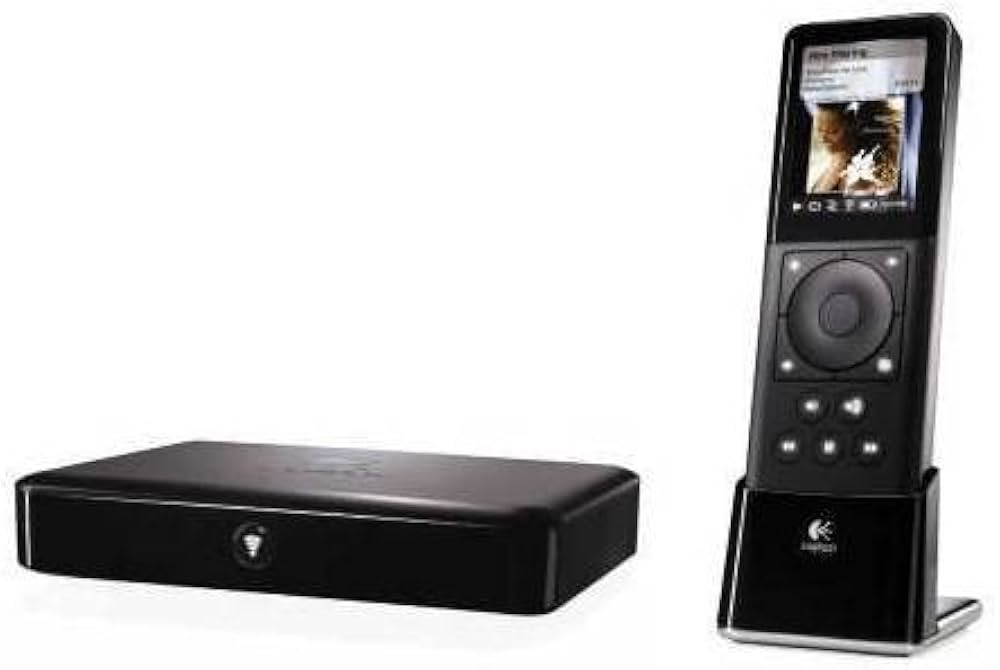
There are quite a few solutions on the market for wireless digital audio. When Logitech acquired Slim Devices a couple years ago, they jumped into the fray with the Squeezebox line of products. Logitech quickly turned out their own twist on the product line, the Squeezebox Duet. We've had one in the HT Guys lab for quite a while and recently got the chance to plug it in, power it on and give it a listen.
According to the Logitech Website, the Squeezebox Duet lets you: "Play songs stored on your computer, tune in to thousands of Internet radio stations, or connect to online services such as Pandora® and Rhapsody. Plus, the multi-room controller with 2.4-inch color display and scroll-wheel navigation makes it easy to browse, select, and play music from the palm of your hand."
We reviewed the original Squeezebox wireless music player on Episode #67 before it was in the Logitech fold. Overall we were very satisfied. We found some slight sync issues when multiple players were used to create a whole house audio system, but with product fixes and enhancements it seems that all of those issues have been solved. That original Squeezebox player is still available for around $200. The original player has a built in VFD screen to help you access music and display what is currently playing. It also comes with a pretty standard hard button IR remote for control.
The Duet is quite different. The player, or Receiver, is a small, nondescript box with one button on the front. On the back is an optional Ethernet port for connecting your wired home network, the easier solution is to just connect it to your wireless (802.11g) network. It has both analog stereo and digital (coax and optical) audio outputs for connecting to your amplifier, receiver or powered speakers. Being so small, the Receiver is incredibly easy to place anywhere. You can pick one up by itself for $150.
But as slim and sexy as the Receiver is, that's not why you'd want the Duet. The real fun part is the Controller. It's a small iPod-like device that allows you to see your whole digital audio collection, including album art and metadata, and select it for playback on the Receiver. It's very easy to use with a standard scroll wheel that responds very well to the touch. It is responsible for setting up your wired or wireless connection and configuring the Receiver. You can pick one up by itself for $292.
Setup
Setup involves 3 steps. First, you install the server software, called SqueezeCenter, on a computer on your network. SqueezeCenter can be run on Windows, Mac, Debian/Ubuntu, Red Hat, and Netgear ReadyNAS. The software is very easy to install and configure. Part of that setup is to point it at your digital music collection so that it can share the files with your Squeezebox players. SqueezeCenter can be accessed with any Internet browser, so you can control it with any computer or portable device on the network.
Second, you configure the Controller to get onto your wireless network. This may involve selecting a specific network and inputting a security key. Once done, you move to the third step. That involves pressing the button on the front of the Receiver so that it can connect to the Controller. The Controller then configures the Receiver to find the SqueezeCenter Server and access your entire music collection. The whole setup process takes under an hour to complete.
Use
There isn't much to say about use except that it's incredibly easy and fun. The two nontechnical users we asked to try the system were Braden's wife and his eldest son, a 7 year old second grader. Both were able to access the music library with ease and change music selection. His son even found the listing of the top 50 podcasts at PodcastAlley and started playing back a recent episode of the HT Guys show. Both gave it very high marks for simplicity, power and usability.
Conclusion
Bottom line, the Duet is a great option for wireless digital music. As game changing as the Squeezebox was when it first came out, the Duet builds on that legacy to create a truly polished wireless audio system. It is every bit as powerful as the Sonos, but costs only a fraction of the price. The Duet runs for around $315 while an equivalent Sonos setup will cost you approximately $750. And you can add zones to the Duet system at will for only $150 per zone. If you happen to have any of the original Squeezebox players, they're completely compatible with the Duet and plug right in as extra zones, playing right in sync with the Duet Receivers.
If you'd like to have music in every room of your home, you can start with a Duet in one room and add more rooms for only $150 as your budget allows. In those rooms where a small executive system might work out well, Logitech also offer the Squeezebox Boom. It's very similar to the original Squeezebox, but includes built in speakers. No need to connect it to a stereo, home theater or pair of powered speakers. It goes for only $279. We haven't had the chance to use one yet, but we'll try to get one so we can comment on it.