
Western Digital WD TV HD Media Player
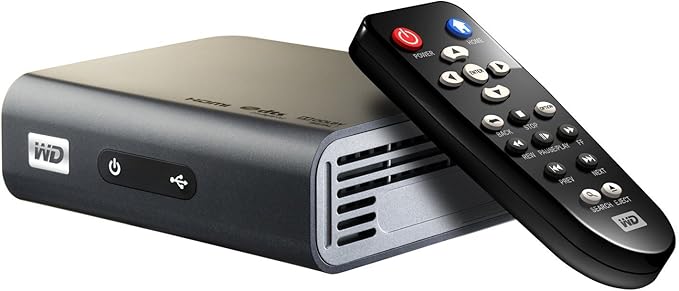
Today we take a look at the Western Digital WD TV HD Media player. The WD TV HD Media Player is a device about the size of an external hard drive that plays A/V content from USB storage media. The WD TV HD Media player is optimized for the WD "My Passport" line of hard drives but it will work with other USB devices (we'll discuss this later). The player supports 1080p for content and menus navigation.
Features
- Thumbnail and list views - Browse your content by filename or by thumbnails of photos, album covers and movie cover art.
- Media Library - This unique feature lets you view all your media by media type in one menu regardless of its location in folders or drives. You can view your content by categories such as genre, album, artist and date.
- Search - Search by genre, title, artist, filename and partial filename.
- Access two USB drives simultaneously
- HDMI and composite video connections
- Includes free media conversion software - ArcSoft MediaConverter™ 2.5
- Ultra-compact design
File Formats Supported
- Music - MP3, WMA, OGG, WAV/PCM/LPCM, AAC, FLAC, Dolby Digital, AIF/AIFF, MKA
- Photo - JPEG, GIF, TIF/TIFF, BMP, PNG
- Video -MPEG1/2/4, WMV9, AVI (MPEG4, Xvid, AVC), H.264, MKV, MOV (MPEG4, H.264)
Notes:
- MPEG2/4, H.264, and WMV9 supports up to 1920x1080p 24fps, 1920x1080i 30fps, 1280x720p 60fps resolution
- An audio receiver is required for surround sound output. AAC/Dolby Digital decodes in 2 channel output only
- JPEG does not support CMYK or loss less.
- BMP supports uncompressed format only.
- TIF/TIFF supports single layer only.
Setup
Setup was trivial. There is no network support so setup consisted of connecting power, HDMI, and plugging in an external hard drive. There are also composite connections available nor SDTVs. The player is actually setup for HDTV as default. So many devices are setup to be 4:3 right out of the box.
Performance
The WD TV HD Media Player worked quite well. The menus were more polished than we expected. They looked good displayed on a 65 inch 1080p TV. Navigation was simple and intuitive. Once a drive is plugged in the media player scans it for content and organizes it by type. You don't have to go hunting for photos, music or video. You can even search for a file by name. We attached a universal card reader, an iPod, and an external Western Digital Hard Drive. All three were recognized. The iPod had limited functionality; it was attached just for fun. The device is optimized for Western Digital's "My Passport" line of drives and supports FAT32, NTFS, HFS+ (no journaling) file formats. But we found no issues with any drive we attached to it.
The WD TV HD Media player does not support protected premium content such as movies or music from the iTunes® Store, Cinema Now, Movielink®, Amazon Unbox™, and Vongo®. Nor will it decode Dolby Digital beyond two channel. But what it does do is playback pretty much any video you can throw at it. Ara has been busy converting his VHS Library to mpeg4 and found that the media player not only played the video but did a good job of upconverting it to 1080p.
If you have listened to the podcast for a while you know that Ara has an HD Homerun and can record OTA HDTV programs on his computer. These programs are both 1080i and 720p and contain Dolby Digital 5.1 audio. For this evaluation a few recordings were copied to the WD Hard Drive which was then connected to the media player. They were immediately recognized and made available via the player. The looked beautiful when displayed on the TV and while the sound was not 5.1 it did sound clear. The only real complaint we have about the player is that it does not support Dolby Digital 5.1 audio. Music playback is just as easy. Copy mp3 or AAC files to the hard drive and you are good to go. The Album art is even displayed in the GUI.
The player comes with a nicely laid out remote control. It's small and does not have a ton of buttons.
Conclusion
Ara was fully anticipating selling the player after he was done with the review. However, due to its tiny size and ease of transport, he now sees it as a great device for travel. And yes, Western Digital got it right by making it a perfect complement to the "My Passport" line of hard drives.